
Welcome to Ciklik
Application Overview
Section titled “Application Overview”Log in to your Ciklik account using the link below: https://app.ciklik.co/login
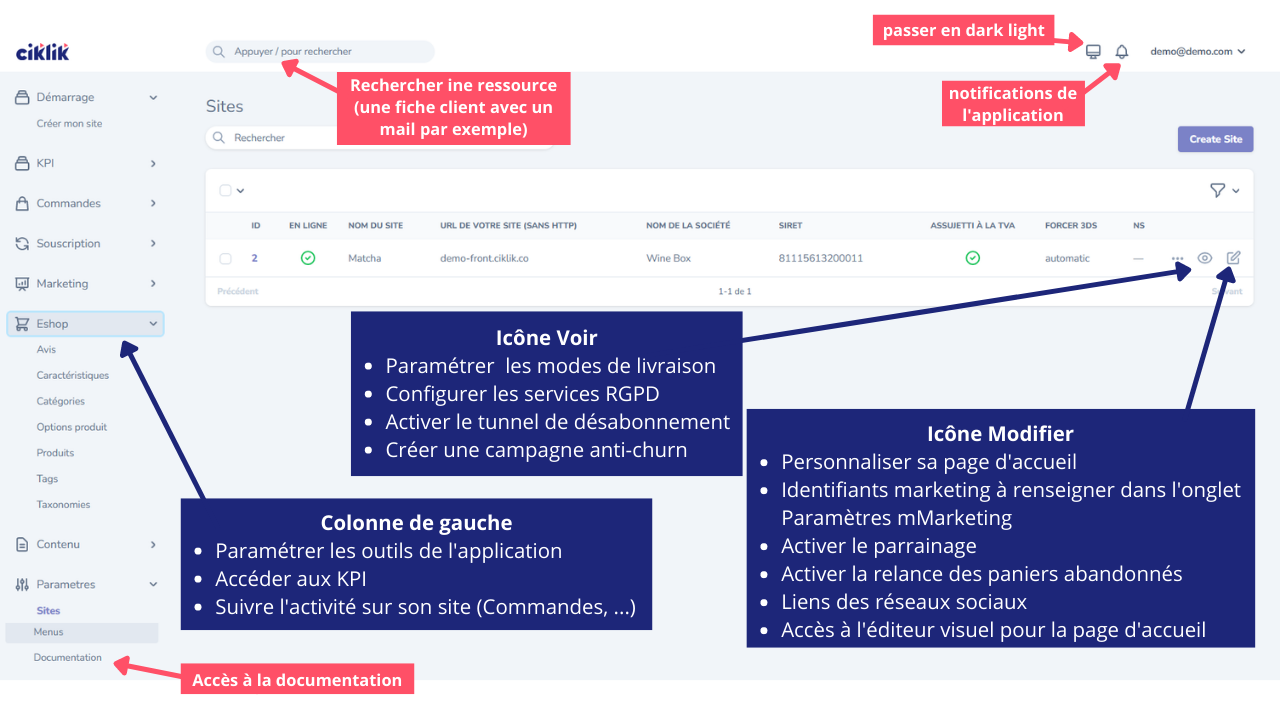
Access to the application features is available from the various sections in the left column.
You will find a shortcut to the Ciklik Academy (Documentation) at the bottom of this column.
You will be notified of application updates via the small bell icon in the top right corner. This is also where you can select your display mode: light or dark.
To start customizing your site, expand the Settings section at the bottom of the left column, click on Sites, then on the pencil icon (edit) and open the visual editor next to the Homepage content field.
Your Site
Section titled “Your Site”Ciklik allows you to create an e-commerce site dedicated to subscription management.
Several elements can be customized:
- Logo and banner
- Colors and fonts
- Homepage
- Content pages
- Menus
Your Subscription Plans
Section titled “Your Subscription Plans”Create your subscription plans from the Plans > Subscription Plans section.
Access the full documentation article: Create your plans
Created and active plans will automatically appear on the Subscribe page (url /formules) of your site.
A visual editor is available on this page to add custom content below the subscription plans.
If you do not wish to keep this default plan display page: Customize the subscribe page
If a criterion affects the price of your plans, create plan groups.
If you need information about your subscribers to customize the content of your boxes, define your profile questions.
Your Carriers
Section titled “Your Carriers”Configure your delivery methods from the Carriers section.
Your Gift Cards
Section titled “Your Gift Cards”Create your gift cards from the Products section.
Payment Module Activation
Section titled “Payment Module Activation”Once your site is ready, contact the support team at support@ciklik.co to request:
- Verification of your plans
- Activation of the payment module
Your site will then be operational and ready to welcome your first subscribers!