
Configure the subscription
Key points
The Ciklik module makes a PrestaShop product available by subscription in two ways: with variations (Purchase Type and Subscription Frequency attributes) or with frequency mode, which does without variations. For a subscription with a minimum commitment, turn on Enable commitment in the module settings, then choose the Commitment cycle (monthly, weekly or daily) and the Number of commitment cycles. During that period, counted from the subscription date, the subscriber cannot cancel from their account. The commitment is a duration, not a minimum number of orders, and it applies to every subscription in the shop.
Configure Subscriptions on Your Store
Section titled “Configure Subscriptions on Your Store”Mode 1: Using Variations
Section titled “Mode 1: Using Variations”Let’s see how to configure subscription purchasing on a catalog product using variations with Purchase Type and Subscription Frequency attributes.
Access Subscription Frequencies and Create New Ones
Section titled “Access Subscription Frequencies and Create New Ones”When installing the Ciklik module, subscription frequencies are already available and can be applied to products of your choice.
They can be found in the Catalog > Attributes and Features section, then Attributes > Subscription Frequency.
You can create new frequencies in this section from PrestaShop version 8 onwards, they will then be available to be applied as variations to products you want to sell by subscription.
If you are on version 1.7.7, follow the Create a New Subscription Frequency procedure below.
Configure the Subscription Offer for a Product
Section titled “Configure the Subscription Offer for a Product”-
Change the product from Simple Product status to Product with Variations status.
-
Go to the Variations tab of the product and, using the variation generator, create as many variations as subscription frequency options desired.
-
If needed, modify the price for each variation in Price Impact (excl. tax) if you want to offer an advantage to subscribers.
Once the variations are generated, you have the flexibility needed to manage:
- SKUs: which can remain identical regardless of the purchase type for the given product (one-time or subscription)
- unique IDs per variation
- a unique price per variation
-
Check the “Accept Orders” box in the Availability Preferences section of the product.
Mode 2: Using the Alternative to Variations
Section titled “Mode 2: Using the Alternative to Variations”Let’s see how to use an alternative mode to variations, in favor of a system based on dedicated frequency tables.
-
Enable this mode in the module settings, Use frequency mode option.

-
Once the mode is enabled, the Improve > Ciklik menu of the PrestaShop back office shows the Frequency Management tab. Create your frequencies there (name, interval count, interval day, week or month): they are then available in the Modules tab of each product page. A frequency can be edited but not deleted.
-
In the Modules tab of the product page, frequencies become checkboxes to make the product eligible for subscription at different frequencies.
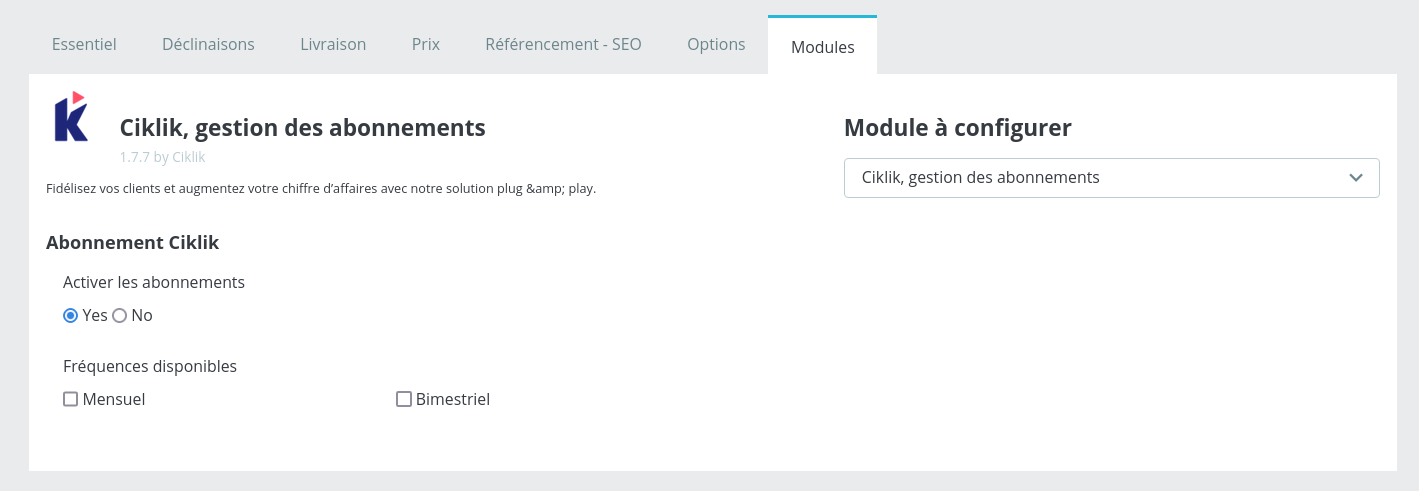
Screenshot from an earlier interface version: module 1.7.7 tab. Recent module versions show a redesigned block, with a frequency management link and a select all box.
For each frequency, in Frequency Management, you have the option to define:
- A percentage discount
- Or a fixed value discount
Configure a Commitment Cycle
Section titled “Configure a Commitment Cycle”You can offer subscriptions with a commitment cycle.
This prevents your customers from unsubscribing for the duration of the commitment.
This feature is activated in the module settings, by selecting Enable Commitment and choosing the commitment duration. The feature can be enabled or disabled as needed.
The commitment duration applies to all subscriptions offered on your site.
The advantages of this feature are as follows:
- Offer a discount when subscribing without risking immediate cancellation
- Support the customer in adopting the subscription product or service
- Control marketing acquisition and retention costs
Offer Upsell
Section titled “Offer Upsell”You can allow your subscribers to add non-recurring products to their next order.
This upsell feature is activated in the Ciklik module. Details are in Add a product to your next order (upsell). With upsell enabled, an add to subscription button is visible on product pages when the visitor is logged into their account. Logged-in users can add a product to their next subscription order directly from product pages.
A popup allows selecting the target subscription. The subscriber finds in their customer area, My Subscriptions section, the details of additional products for each subscription.
They can remove non-recurring products before their next order. Note:
- Upsell requires user authentication to display the option
- Added products are delivered only once on the next rebill
- Compatible with active subscriptions only
The advantages of the upsell feature are:
- Increased average basket and revenue: By suggesting relevant complementary products, you naturally encourage your customers to spend more.
- Enhanced customer loyalty: By offering a wider range of complementary products, you give your customers more reasons to discover new products and stay loyal to your brand.
- Reduced customer acquisition costs: By maximizing sales to your existing subscriber base, you reduce pressure on acquiring new customers, which is often more expensive.
On PrestaShop 1.7.7+
Section titled “On PrestaShop 1.7.7+”Create a New Subscription Frequency
Section titled “Create a New Subscription Frequency”When the module is installed, the available subscription frequencies are:
- Mensuel
- Every 2, 3, 4, 6, 8, 10 and 12 months (“Tous les 2 mois” and so on)
Creating additional subscription frequencies is directly possible in the Attributes section.
There are database manipulations to perform. Here is the complete procedure:
-
Create a new attribute in the PrestaShop admin, on the “Subscription Frequency” option.
-
Once this new attribute is created, retrieve its id. In this example, we will assume that this new attribute has id 33, and it was to create a new 5-month frequency.
-
Connect to the database.
-
Go to the ciklik_frequencies table.
-
Retrieve the id of the created frequency, e.g., 33.
-
Add a row in ciklik_frequencies with id_attribute as 33, interval as ‘month’, and interval_count as 5.
Once done, the new attribute is available and can be used.
Hide Other Payment Methods
Section titled “Hide Other Payment Methods”The module automatically hides other payment methods when the cart contains a subscription. You have nothing to do.
This filtering does not exist. To hide other payment methods when there is a subscription in the cart:
-
Open the file
themes/{theme}/templates/checkout/_partials/steps/payment.tpl. -
Add the following code above
{foreach from=$payment_options item="module_options"}:{assign var="ciklikOption" value=null}{foreach from=$payment_options item="module_options"}{if isset($module_options[0]) && $module_options[0].module_name == 'ciklik'}{assign var="ciklikOption" value=$module_options}{break}{/if}{/foreach}{if $ciklikOption !== null}{assign var="payment_options" value=[$ciklikOption]}{/if}
Frequently asked questions
How do I offer a subscription with a minimum commitment on PrestaShop?
In the Ciklik module settings, turn on Enable commitment, then choose the Commitment cycle (Monthly, Weekly or Daily) and the Number of commitment cycles. For example, 6 monthly cycles commit the subscriber for 6 months from their subscription date.
Does the commitment require a minimum number of orders?
No. The commitment is a period during which the subscriber cannot cancel their subscription. It is not tied to a minimum number of orders.
What does the subscriber see during the commitment period?
In the list of subscriptions in their customer account, the cancel button is replaced by the mention Cancellable from: followed by the date the commitment ends.
Can I set a different commitment for each product?
No. The commitment duration set in the module applies to all subscriptions offered in your shop.
Variations or frequency mode: which should I choose?
Variations use the Purchase Type and Subscription Frequency attributes, with a price per variation. Frequency mode avoids variations: you tick frequencies in the Modules tab of the product page, each frequency can carry a percentage or fixed discount, and stock is shared across all frequencies.