Ciklik sends the life of your subscriptions to your Klaviyo account: start, reminder before charge, renewal, failed payment, expiring card, pause, resume, change, cancellation. You then build your own automated emails (the “flows”) and your subscriber segments in Klaviyo. For a PrestaShop store, customers, orders and products keep coming from the Klaviyo module for PrestaShop: Ciklik only sends what that module does not know, so nothing is counted twice. Connecting takes five minutes: you create a private API key in Klaviyo, then paste it in Ciklik. Right away, the profile of all your subscribers, current and former, is sent to Klaviyo (for a PrestaShop store, only the profiles already created by the Klaviyo module are completed). For a box store, if you choose a Klaviyo list, your customers are subscribed to your marketing emails in it, as with Mailchimp; without a list, nobody is subscribed. For a PrestaShop store, Ciklik subscribes nobody: consent stays with the Klaviyo module for PrestaShop. The integration is free; only your Klaviyo plan is paid, to Klaviyo.
Klaviyo already knows what your customers buy. It does not know where their subscription stands: that a charge is coming, that a card was declined, that a subscriber paused or cancelled. Ciklik tells it, as it happens. You can then:
give notice before each charge, with the content of the next delivery and a button to the subscription area;
recover failed payments, with a button that opens the payment page directly;
catch the expiring card before the charge fails;
welcome new subscribers and win back those who left, with the reason they left;
target your campaigns at active, paused, unpaid or cancelled subscribers.
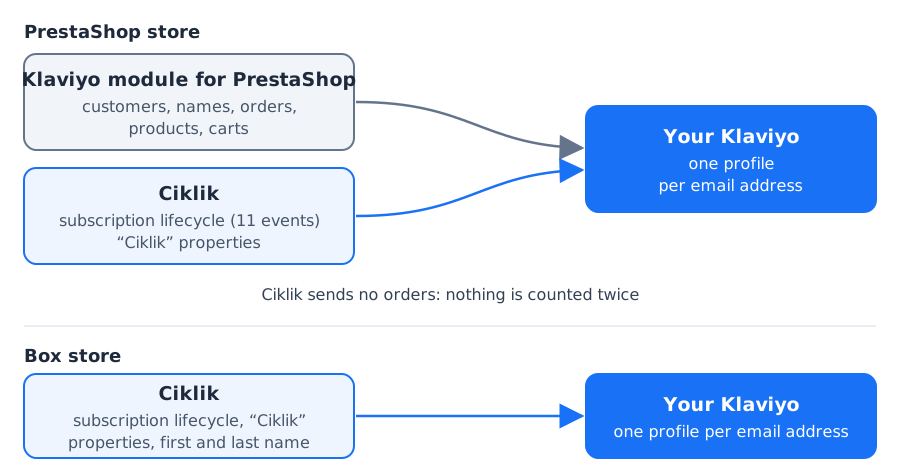
Keep the Klaviyo module for PrestaShop: it sends your customers, their names, orders (“Placed Order”), products and carts. Each Ciklik renewal creates a real PrestaShop order, which this module sees like any other.
Ciklik adds the subscription lifecycle and “Ciklik” properties on the profile. It sends no order, no name, no cart, subscribes nobody to your marketing emails and creates no profile: it only completes the ones the module created.
Box store
Ciklik is the only one talking to Klaviyo: it sends the subscription lifecycle, the “Ciklik” properties, and the subscriber’s first and last name.
Orders and the catalog are not sent to Klaviyo.
In both cases, Ciklik finds the profile by the customer’s email address, like the Klaviyo module for PrestaShop: a customer has a single profile in Klaviyo.
No marketing subscription on a PrestaShop store. Consent to your marketing emails stays with the Klaviyo module for PrestaShop (your store’s newsletter checkbox): Ciklik subscribes nobody, to any list, neither at connection nor when a subscription is created.
No profile created or re-created on a PrestaShop store. Ciklik updates the profiles the Klaviyo module for PrestaShop created, and nothing else. If you delete a profile in Klaviyo, for example at the request of a customer exercising their right to erasure, Ciklik does not re-create it: their subscription events are no longer sent.
Box store: no marketing subscription without a chosen list. As long as you have not chosen a list in the settings, Ciklik subscribes nobody to your marketing emails: a profile created by Ciklik is in no list. See subscribing to your list.
Never a resubscription. A customer who unsubscribed, in Klaviyo or in Ciklik, is never subscribed again, and Ciklik never unsubscribes anyone.
Box store: never a deleted customer sent again. A customer whose profile you deleted in Klaviyo is never sent again by Ciklik, even if they start a subscription again. See a customer deleted in Klaviyo.
No orders sent: Klaviyo’s revenue stays your store’s, without duplicates.
No event history at connection: events are sent from the moment Klaviyo is connected. Profiles, however, are sent right away with their “Ciklik” properties (for a PrestaShop store, only those the Klaviyo module already created; see the sync).
No email sent by Klaviyo on your behalf: nothing goes out until you have built and turned on your flows in Klaviyo.
A Klaviyo account in your name, where you can create API keys.
For a PrestaShop store, the Klaviyo module for PrestaShop connected to that same account: it creates your customers’ profiles and sends your orders and products. Without it, Ciklik has no profile to complete and sends nothing.
For a PrestaShop store, preferably the Ciklik module 1.27.0 or later: a customer who changes their email in your store is then followed within a minute (see the email change).
The right to edit your site in Ciklik, as for WhatsApp, for the Manage the Klaviyo connection action and the Klaviyo block of the Integrations tab. For the Forget this customer in Klaviyo action, the right to edit your customers. A read-only access sees none of this.
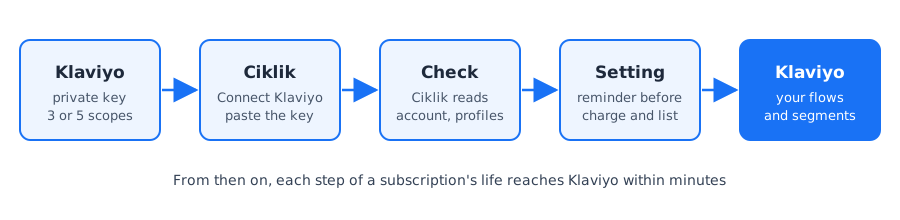
Private key. In Klaviyo, create a private API key with three scopes, five for a box store that chooses a list, and Data Privacy if you want to be able to request the GDPR deletion of a profile (optional). Details
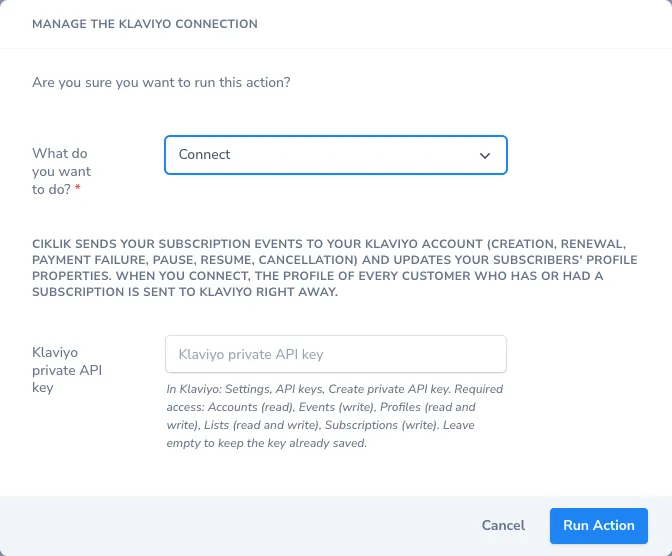
Connection. On your site record in Ciklik, run Manage the Klaviyo connection, choose Connect and paste the key. Your subscribers are sent to Klaviyo right away. Details
Settings. With Manage the Klaviyo connection, Edit settings: choose how many days before the charge the reminder is sent and, for a box store, the list to subscribe your customers to (optional). Details
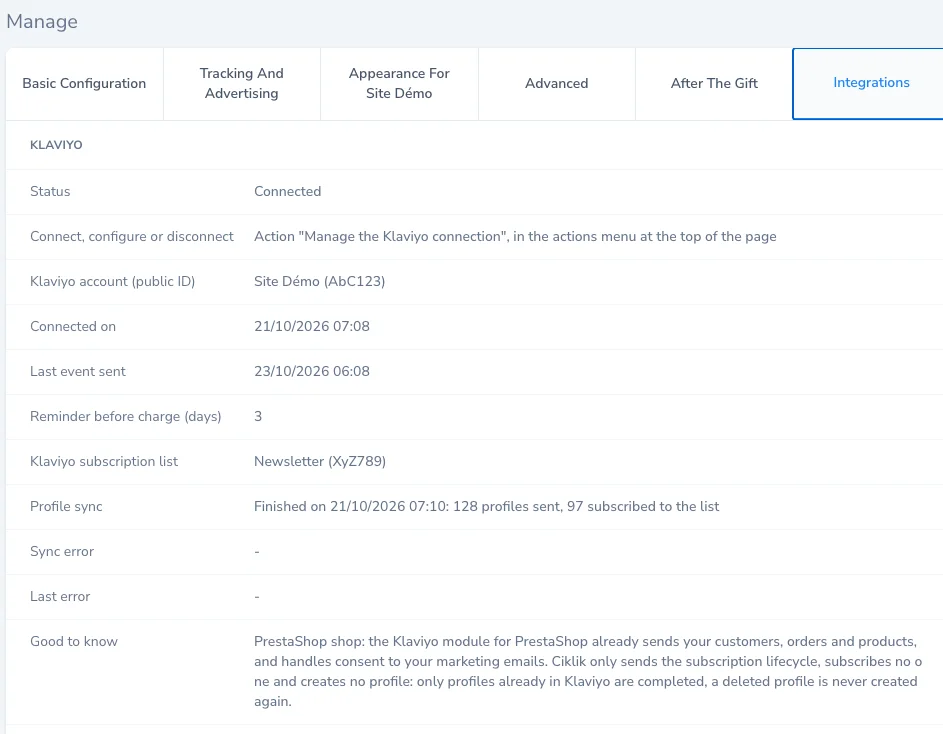
Check. Look at the Klaviyo block of the Integrations tab of the site record. Details
Your flows. Build your automated emails in Klaviyo, starting from the examples.
A private API key is a password meant for software: it lets Ciklik write to your Klaviyo account, and nothing more than what you allow.
In Klaviyo, open your account menu (bottom left), then Settings and the API keys section.
Click Create Private API Key and name it, for example “Ciklik”.
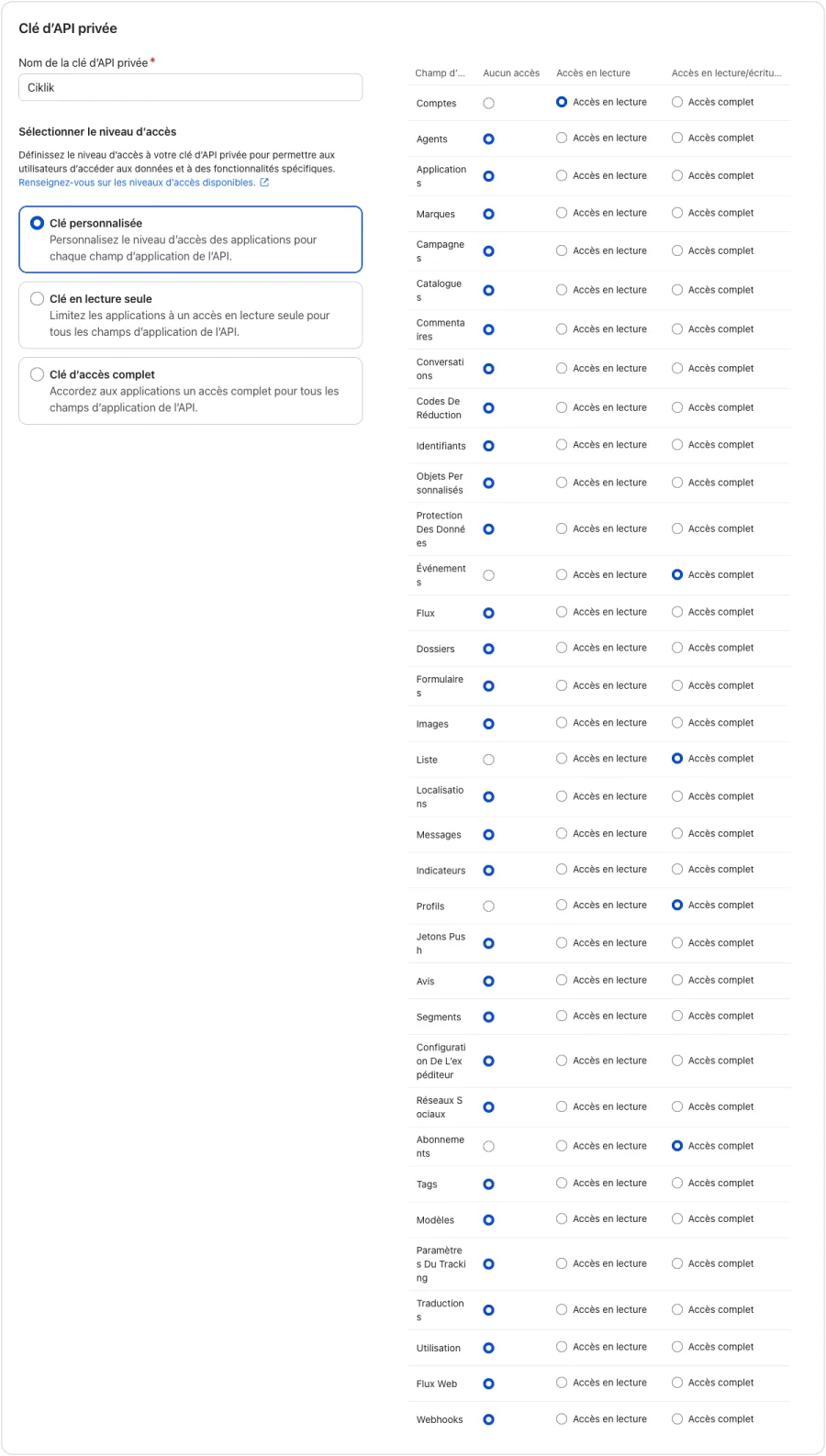
Choose Custom Key, then grant these scopes, and no others (except Data Privacy, optional, see the note below the table):
Scope in Klaviyo
Level
What Ciklik uses it for
Accounts
Read Access
Check the key and show your account name in Ciklik.
Events
Full Access
Send your subscription events.
Profiles
Full Access
Update the profiles’ “Ciklik” properties and follow an email change. PrestaShop store: check that a profile exists before writing. Box store: create a subscriber’s profile if it does not exist, and read its consent before any subscription.
Lists
Full Access
Box store with a list: offer you your lists and add your customers to them.
Subscriptions
Full Access
Box store with a list: subscribe your customers to your marketing emails in the chosen list.
Create the key and copy it right away: it starts with pk_. Klaviyo may not show it again.
In Ciklik, go to Settings > Management > Sites and open your site record (eye icon).
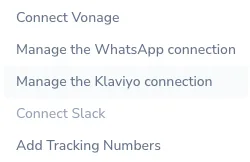
In the record’s actions menu, choose Manage the Klaviyo connection.
What do you want to do? is already on Connect: paste the key in the Klaviyo private API key field, then run the action.
What Ciklik checks. Before saving anything, Ciklik checks that the key has the format of a Klaviyo private key, then reads your account at Klaviyo. If Klaviyo answers, the message “Klaviyo is connected to the account …” shows your account name: check it is the right one. A refused key is never saved.
What happens next. As soon as Klaviyo is connected, Ciklik sends the profile of all your subscribers to Klaviyo, see the sync.
What Ciklik cannot check at that point. The Events, Profiles, Lists and Subscriptions scopes are only checked on their first use: if one is missing, the Klaviyo block of the Integrations tab shows it (see errors).
The key stays secret. Once saved, it is encrypted and never shown again, neither on the record nor in the action history. To change it, run Manage the Klaviyo connection, Edit settings, and paste the new key. A field left empty keeps the key already saved; if Klaviyo had refused it, it is checked again, which is useful after a temporary Klaviyo outage.
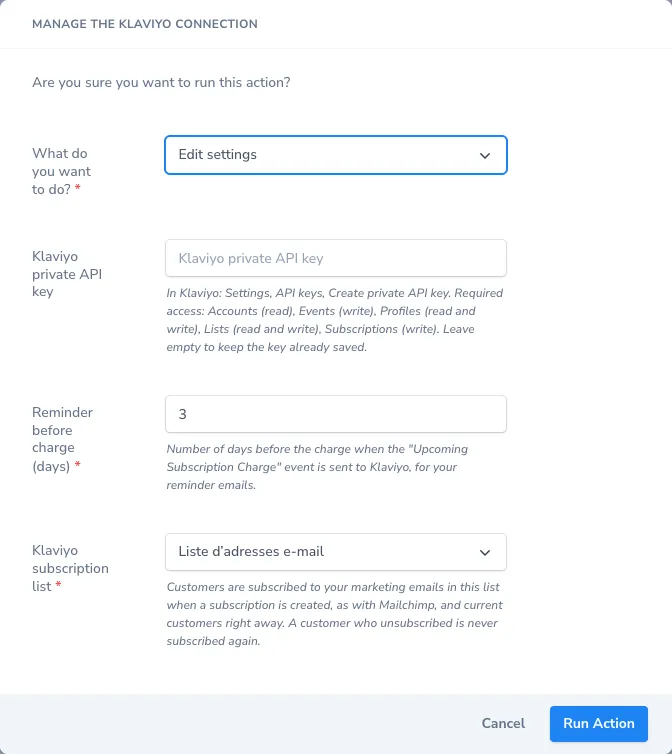
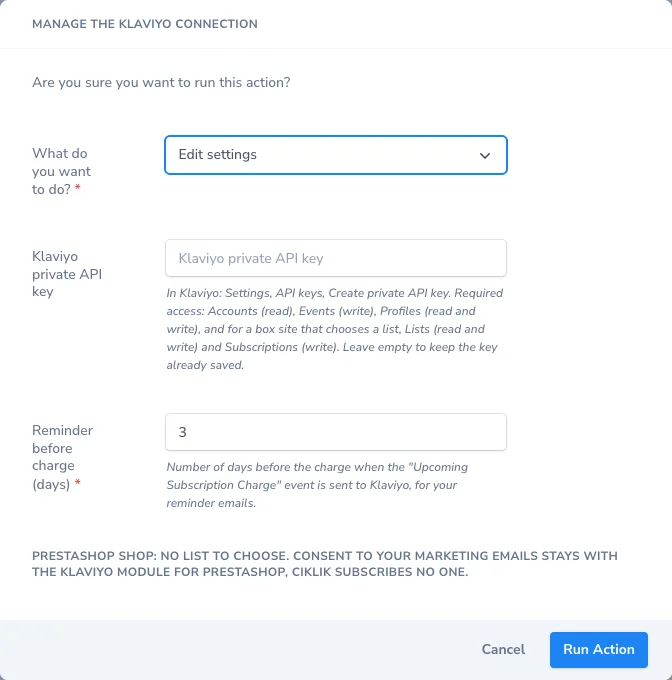
In the site record’s actions menu, choose Manage the Klaviyo connection, then, in the What do you want to do? list, Edit settings.
Reminder before charge (days): how many days before the charge the reminder is sent, from 1 to 14 (3 by default).
Klaviyo subscription list, box store only: choose the list to subscribe your customers to your marketing emails, or No list: Ciklik subscribes nobody. Lists are read from your Klaviyo account when you open this choice. For a PrestaShop store, this choice does not exist: the window reminds you that consent stays with the Klaviyo module for PrestaShop.
Run the action.
The reminder. The Upcoming Subscription Charge event is sent every morning around 8:30 a.m. (Paris time), for active subscriptions whose charge falls on that day plus the chosen delay. A paused subscription gets no reminder. Lengthening the delay skips the reminder for charges already closer than the new delay.
The list (box store). Choosing a new list starts the sync again: your current and former customers are subscribed to it right away, under the rules of subscribing to your list. Going back to No list stops new subscriptions; those already made remain.
At connection, Ciklik does not wait for a subscription to change: it sends Klaviyo right away the profile of every customer who has or had a subscription on your site, with all their “Ciklik” properties (active subscriber or not, status, next charge, products, seniority, number of renewals, cancellation reason…). For a box store, first and last name are sent too.
PrestaShop store: only the profiles already in Klaviyo, created by the Klaviyo module for PrestaShop, are updated. A customer Klaviyo does not know, or whose profile you deleted, is not created; the number of profiles sent reflects it.
No event is sent for this initial state: your flows do not trigger, no email goes out.
Duration: a few minutes for a few thousand subscribers; Ciklik respects Klaviyo’s limits and picks up where it left off after an outage.
Follow-up: the Klaviyo block of the Integrations tab shows the state of the sync, the number of profiles sent and subscribed to the list (always zero for a PrestaShop store), and any error.
When it runs: at connection, when a new list is chosen (box store), and on request with Manage the Klaviyo connection, Resync. A resync starts from the beginning and never creates duplicates: a customer has a single profile.
Ciklik always sends the address in lower case and without spaces, as Klaviyo stores it. When a customer changes their email, Ciklik writes under the new address from then on, and the profile of the old one loses its “Ciklik” properties: an “active subscribers” segment no longer targets an address the customer has left. That profile is neither renamed nor deleted: its consent to your marketing emails was given by the old address, it does not move to the new one.
Box store: the change is taken into account as soon as the customer edits their email in their customer area, or you edit it in Ciklik. Ciklik writes under the new address at the next event, creating its profile if needed, without marketing consent.
PrestaShop store: your store is the reference. With the Ciklik module 1.27.0 or later, the module tells Ciklik as soon as a customer changes their email in the store (from their account, your back office, an import or the webservice): Ciklik reads the address again in your store and takes it over, usually within a minute. With an older version of the module, the new address is only taken over at the customer’s next order or renewal: update the module, there is nothing to configure. In both cases, the address is not taken over if another customer of your site already uses it, and an address changed only in Ciklik goes back to the store’s. The next events go to the profile of the new address, once the Klaviyo module for PrestaShop has created it.
For a box store, Ciklik subscribes your customers to your marketing emails the same way as with Mailchimp, only if you have chosen a list:
When: when a subscription is created (first payment), when a subscription resumes, when a gift subscription is opened, and during the sync for your current and former customers.
Who: a customer who has never been subscribed or unsubscribed in Klaviyo. A customer already subscribed to your emails (through your store, a Klaviyo form) is only added to the list, without touching their consent.
Never: a customer who unsubscribed (in Klaviyo or in Ciklik), whose address bounces or who marked a message as spam. Ciklik never unsubscribes anyone: a cancellation does not remove the customer from the list.
Double opt-in: for a new subscription, the list decides; if it requires a confirmation, Klaviyo sends it to the customer. For your existing customers, subscribed during the sync, the subscription is recorded directly, dated from the start of their first subscription, without a confirmation email and without triggering your “added to list” flows.
You delete a customer’s profile in Klaviyo, for example because they asked you to erase their data. Klaviyo does not notify any software of a deletion, and it recreates a profile as soon as it receives a new event for its email address. Ciklik protects you from this.
Box store. Before each send (event, profile update, sync, list subscription), Ciklik checks in your Klaviyo account that the customer’s profile still exists. If a profile Ciklik had already seen there is gone, you deleted it: the customer is forgotten for this site.
Forever. Ciklik sends nothing more about them to Klaviyo: no event, no “Ciklik” properties, no list subscription, even if they resume a subscription or start a new one. This cannot be undone from Ciklik.
A customer never sent is still created as usual: that is Ciklik’s role on a box store.
Right after a first send, Klaviyo takes a moment to create the profile. So Ciklik never takes an absence for a deletion until it has seen the profile in your account: it looks it up one hour after the send, then 6 and 24 hours after if it is not there yet. A profile deleted before this first check may be recreated by the next send; delete it again, or rather use the Forget this customer in Klaviyo action, which applies at once.
A Klaviyo outage forgets no one: if Klaviyo does not answer, Ciklik tries again later, without concluding anything.
If the customer changes their email address in Ciklik, the old address stays forgotten. For Klaviyo the new one is another person: Ciklik creates it at the next send. To forget it too, use the action below.
If you connect another Klaviyo account to the site, your customers are sent to it as usual, except those already forgotten, who stay forgotten.
Ciklik does not keep the email address of a forgotten customer: only a fingerprint, specific to your site, from which the address cannot be recovered.
The key needs the Profiles scope: without it, Ciklik cannot check profiles and sends nothing more; the error shows in the Integrations tab.
PrestaShop store. Profiles are created by the Klaviyo module for PrestaShop, never by Ciklik: a profile you delete in Klaviyo is never recreated by Ciklik. The action below is not needed there.
To forget a customer at once, without waiting for the next send, or a customer Ciklik has never sent yet (you need the right to edit your customers):
Open the customer’s page in Ciklik.
In the page’s actions menu, choose Forget this customer in Klaviyo.
If needed, tick Also ask Klaviyo to delete their profile (GDPR), then click Run Action.
Without the box: Ciklik will never send this customer to Klaviyo again for this site. Their profile stays as it is in Klaviyo.
With the box: Ciklik also asks Klaviyo to delete every profile with this email address. Klaviyo does it in the background, and the profile then shows among your account’s deleted profiles. The key needs the Data Privacy scope (see step 1).
The forgetting is saved first: if Klaviyo refuses or does not answer, the customer stays forgotten and you can run the action again, box ticked, for the deletion.
The site record shows an Integrations tab, read only. Its Klaviyo block contains:
Line
What it shows
Status
Connected, Not connected, Disconnected, or Error: key refused by Klaviyo, paste a new key.
Connect, configure or disconnect
A reminder of the action to use: Manage the Klaviyo connection, in the actions menu at the top of the page.
Klaviyo account (public ID)
Your Klaviyo account name and its public ID, to check you connected the right one.
Connected on
The connection date.
Last event sent
The time of the last successful send (refreshed at most every 10 minutes).
Reminder before charge (days)
The delay set in Edit settings.
Klaviyo subscription list
The list your customers are subscribed to, or No list: Ciklik subscribes nobody; for a PrestaShop store, None: consent handled by the Klaviyo module for PrestaShop.
Profile sync
Waiting, in progress, finished or stopped, with the number of profiles sent and subscribed to the list.
Sync error
The code returned by Klaviyo if the sync stopped, or a dash.
Last error
The date and code of the last error returned by Klaviyo, or a dash.
Good to know
A reminder of what Ciklik sends and does not send.
In Klaviyo, events show up in Analytics > Metrics and on each customer’s profile, under the names given in the list of events. A metric only appears with the first event of that type: as long as no card has expired, for example, Expiring Payment Card is not yet offered as a flow trigger.
A few minutes after the fact: Ciklik sends each event about 2 minutes later, in the background, never slowing down a payment or a cancellation.
PrestaShop store, start and renewal: Started Subscription and Renewed Subscription wait until your store has created its order, to carry its number (one hour at most, then the event goes without it).
Reminder before charge: every morning around 8:30 a.m.
Expiring card: on the 25th of each month.
One fact, one event: if the same fact is reported twice, Klaviyo counts it once.
Klaviyo unavailable: Ciklik retries for a day, then records the error in the Klaviyo block of the Integrations tab.
PrestaShop store, missing profile: an event is only sent to a profile already in Klaviyo. For a new customer, Ciklik waits up to two hours for the Klaviyo module for PrestaShop to create their profile, then gives up without an error. A customer whose profile you deleted therefore no longer receives events.
PrestaShop store: each renewal is also a “Placed Order”
Each Ciklik renewal creates a real order in your store, and the Klaviyo module for PrestaShop sends it as Placed Order (and Ordered Product), like an order placed on the site. This is intended: your revenue and customer lifetime value stay right in Klaviyo. But a flow triggered by Placed Order (post-purchase thank you, review request, product suggestions) then writes to the subscriber at every renewal, on top of your subscription messages. To avoid it, see Avoiding a double send.
Invalid key: a Klaviyo private key starts with pk_.
You pasted the public key (6 characters) or an incomplete key, or left the field empty while no key is saved (after a disconnection). Copy the whole private key, without spaces.
Klaviyo refuses this key: check that it is active and has read access to Accounts.
The key was deleted, or it lacks Accounts read access. Create a new key with the scopes of step 1.
Klaviyo is not responding right now, try again in a few minutes.
Temporary Klaviyo outage. Try again later; in Edit settings, leave the key field empty if you had already saved it.
Klaviyo refuses to read the lists: give the key the Lists access (read and write).
The key lacks Lists: create a new key with the scopes of step 1.
This list no longer exists in your Klaviyo account.
The list was deleted in Klaviyo in the meantime: choose another one.
This operation is not possible in the current state of the Klaviyo connection.
The connection changed while the window was open: reload the record and run the action again.
Tick the confirmation to disconnect Klaviyo.
To Disconnect, tick I confirm disconnecting Klaviyo.
Klaviyo could not confirm the account of this key.
Klaviyo answered without being able to read the account. Try again, then create a new key if the message comes back.
Between 1 and 14 days.
The reminder delay must be a whole number from 1 to 14.
Customer forgotten: Ciklik will never send them to Klaviyo again.
The Forget this customer in Klaviyo action worked. Nothing else to do.
This customer was already forgotten: Ciklik no longer sends them to Klaviyo.
The customer had already been forgotten. Nothing to redo; if the box is ticked, the deletion request still goes.
Deletion requested from Klaviyo: the profile will appear in Deleted Profiles once deleted.
Shown after “Customer forgotten” when the box is ticked. Klaviyo deletes the profile in the background, then it appears in Deleted Profiles. Nothing else to do.
Deletion refused by Klaviyo: give the key the Data Privacy (write) access, then run the action again with the box checked.
The customer is forgotten, but the key lacks the Data Privacy scope. Add it to the key in Klaviyo, or create a key with this scope and paste it in Edit settings. Then run the action again with the box ticked, or delete the profile yourself in Klaviyo.
Klaviyo is not responding: run the action again with the box checked in a few minutes.
The customer is forgotten; only the deletion request did not go. Run the action again later, box ticked.
Klaviyo did not accept the deletion request: delete the profile in Klaviyo.
Klaviyo refused in another way than a missing scope, or the request failed. The customer is forgotten; delete their profile yourself in Klaviyo.
Deletion not requested: Klaviyo is not connected on this site.
The customer is forgotten; without a saved key, Ciklik cannot ask Klaviyo anything. Delete the profile in Klaviyo.
This customer has no usable email address.
The customer is not forgotten and nothing is sent to Klaviyo. Correct their email address in Ciklik, then run the action again.
You are not allowed to manage Klaviyo here.
Your access does not allow this action: you need the right to edit the site (or, to forget a customer, the right to edit your customers). Nothing has been changed.
PrestaShop shop: Ciklik never creates Klaviyo profiles, deleting the profile in Klaviyo is enough.
On a PrestaShop store the action is not needed: delete the profile in Klaviyo.
Later, the status switches to “Error: key refused by Klaviyo, paste a new key”. The key was deleted in Klaviyo, or it lacks a scope, most often Events. No more events are sent: create a new key with the scopes of step 1, then paste it in Manage the Klaviyo connection, Edit settings. Events that happened during the error are not sent afterwards.
The “Last error” line shows a code while the status does not change. Klaviyo refused one specific event (for example an email address it deems invalid), or it stayed unreachable for more than a day. Other events keep going. The same line reports a refused list subscription, most often because the key lacks Lists or Subscriptions.
The “Sync error” line shows “Klaviyo API 403 (permission_denied)”. The key lacks a scope, often Profiles full access, or Lists or Subscriptions when a list is chosen. Without Lists or Subscriptions, events keep going; without Profiles, a PrestaShop store no longer sends its events. Create a key with the scopes of step 1, paste it in Edit settings, then run Resync.
Run Manage the Klaviyo connection, choose Disconnect and tick I confirm disconnecting Klaviyo: the key is erased, no more events are sent to Klaviyo and nobody is subscribed to your list any more. Data already sent and subscriptions already made stay in your Klaviyo account, and your flows stop triggering for lack of events. To reconnect, run Manage the Klaviyo connection again with a key. Also remember to delete the key in Klaviyo if you no longer use it.
Klaviyo and Mailchimp can be connected at the same time on the same site: each works on its own. On a box store that has chosen a list in each of the two, each subscribes your customers to its own list, under the same rules. Just make sure you do not send the same message twice to your subscribers, once from each tool.
Frequently asked questions
Is Ciklik's Klaviyo integration paid?
No. Ciklik does not charge for the Klaviyo integration, it is open to every site. Only your Klaviyo plan is paid, directly to Klaviyo, at its prices.
Should I keep the Klaviyo module for PrestaShop?
Yes, for a PrestaShop store. The Klaviyo module creates your customers' profiles, handles their consent and sends their names, orders and products. Ciklik only sends the subscription lifecycle, on the profiles the module created, so nothing is counted twice.
Which scopes should the private API key have?
Accounts read access, and Events and Profiles full access. For a box store that chooses a subscription list, add Lists and Subscriptions full access. Data Privacy full access is optional: it is only needed to ask Klaviyo to delete a profile for GDPR.
Does Ciklik subscribe my customers to my marketing emails in Klaviyo?
Never for a PrestaShop store: consent stays with the Klaviyo module for PrestaShop. For a box store, only if you choose a list in Edit settings, as with Mailchimp: your customers are subscribed to it when a subscription is created and during the sync. A customer who unsubscribed is never subscribed again. Without a list, nobody is subscribed.
I deleted a customer's profile in Klaviyo: will Ciklik re-create it?
No. For a PrestaShop store, Ciklik only updates profiles already in Klaviyo, neither the sync nor the events re-create a deleted profile. For a box store, Ciklik checks before each send that the profile still exists: a profile it had already seen and that is gone is forgotten forever, even if the customer resumes a subscription. To forget a customer at once, and if needed ask Klaviyo to delete them, use the Forget this customer in Klaviyo action on their page.
Are existing subscriptions sent at connection?
Profiles are: at connection, the profile of every customer who has or had a subscription is sent right away, with its Ciklik properties, without any event and without triggering any flow (for a PrestaShop store, only the profiles already in Klaviyo). Past events (former renewals, cancellations) are not sent; events are sent from the connection onwards.
Can I use Klaviyo and Mailchimp at the same time?
Yes. Both can be connected to the same site and each works on its own. Just avoid sending the same message through both tools.