Klaviyo: events, flows and segments for your subscribers
Key points
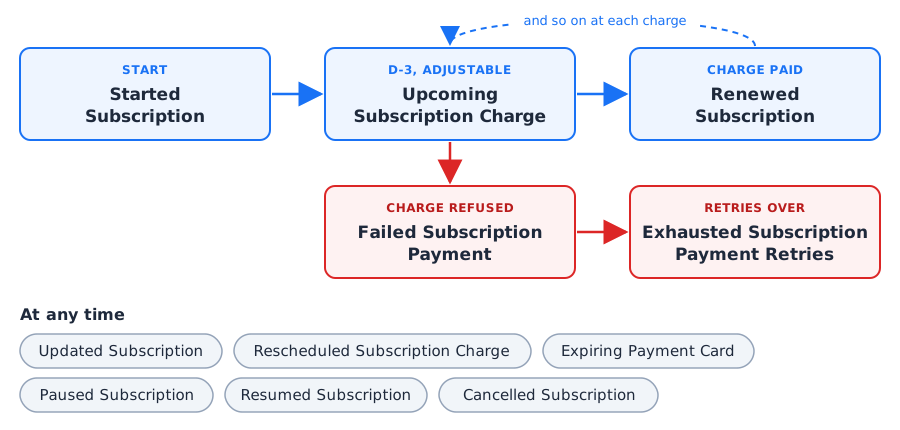
Once Klaviyo is connected, Ciklik sends an event at each step of a subscription’s life: start, reminder before charge, renewal, failed payment, retries over, expiring card, change, rescheduled date, pause, resume, cancellation, and for box stores the gift subscription. Each event can trigger an email flow in Klaviyo and carries what you need to write it: subscription content, next charge date, link to the subscription area, payment link after a refusal. Ciklik also keeps “Ciklik” properties up to date on each subscriber’s profile, to build your segments: active, paused, unpaid, cancelled subscribers.
When: the first payment of a new subscription succeeds. Once per subscription.
Useful: the subscription content, its frequency, the next charge date, the amount paid, the link to the subscription area. PrestaShop store: the number of the order created by the store.
Upcoming Subscription Charge
When: a few days before each charge, 3 by default (1 to 14, adjustable), around 8:30 a.m. Once per charge, paused subscriptions excluded.
Useful: the charge date, the number of days left, the content, the link to the subscription area.
Renewed Subscription
When: a renewal is paid, whatever the payment method, including after a refusal.
Useful: the amount paid, the content, the next charge date. PrestaShop store: the number of the renewal order.
Rescheduled Subscription Charge
When: the next charge date is moved, on request (customer, you, module) or, for PrestaShop, for lack of stock at renewal.
Useful: the reason (requested or out_of_stock), who did it, the new date.
When: the payment of a renewal is refused, at each attempt. A refusal on the very first order does not trigger it.
Useful: the refusal reason, the attempt number, the amount due, and the payment link that opens the page to pay directly.
Exhausted Subscription Payment Retries
When: payment retries are over and the renewal remains unpaid. This delivery is neither paid nor shipped; the subscription carries on at the next charge.
Useful: the number of attempts, the amount of the lost order.
Expiring Payment Card
When: on the 25th of each month, for a subscriber charged within the next month whose card expires by then. Once per card and expiry date.
Useful: the expiry date, the card brand, the link to the subscription area.
When: the content or frequency changes: products, quantity, add-ons, options, choices, frequency, plan. One event per type of change and per quarter hour.
Useful: the type of change, who made it (customer, you, module, automatic process), the updated content.
Paused Subscription
When: the subscription is paused, by the subscriber or by you.
Useful: the pause length and its unit (in months; in weeks for a weekly box plan).
Resumed Subscription
When: the subscription resumes, at the end of a pause or after a cancellation (reactivation).
Useful: where it resumes from (pause or cancellation).
Cancelled Subscription
When: the subscription is cancelled, whatever the path, scheduled end included (end of commitment, end of a gift card).
Useful: the reason given in the cancellation survey, and the origin when Ciklik knows it (cancellation link, scheduled end).
Each event carries properties you can show in an email or use as a flow filter. In a Klaviyo email, a property whose name contains spaces is written with the lookup filter, for example {{ event|lookup:'Manage URL' }}.
Properties common to all events
Property
Content
Subscription ID
The Ciklik ID of the subscription.
Interval, Interval Count
The frequency: for example month and 1 for every month, week and 2 for every two weeks.
Next Charge Date
The next charge date (YYYY-MM-DD), while the subscription is active.
Shop Type
box or prestashop.
Subscription Mode
How the subscription is built: box_plan (box with a plan), box_products (box with products), prestashop_frequency (PrestaShop, frequency mode), prestashop_variant (PrestaShop, combination mode).
Manage URL
The link to the customer’s subscription area: the “My subscriptions” page of your PrestaShop store, or the customer area of your box store. The customer logs in with their account.
Subscription content, by type
Type
Properties
Box with a plan
Plan (plan name), Plan ID, Quantity, Price (unit price paid, tax included), Options (multiple-choice answers to the box survey), Choices and Choice Names (products chosen by the customer in their box).
The price is the unit price, tax included, of the event’s order, otherwise of the last paid order. A property that does not apply is absent: no Plan for PrestaShop, no Items for a box with a plan. Free-text survey answers (typed by the customer) are never sent.
Properties specific to some events
Event
Properties
Started, Renewed Subscription
Order ID, Order Total, Currency; PrestaShop store: PrestaShop Order ID, the number of the order that the Klaviyo module for PrestaShop also sends as “Placed Order”.
Upcoming Subscription Charge
Charge Date, Days Before.
Failed Subscription Payment
Order ID, Order Total, Currency, Failure Reason, Attempt, Payment URL.
Cancellation Reason (answers to the survey of this cancellation), Cancellation Source (signed_link for the cancellation link of the reminder, scheduled_end for a scheduled end, empty otherwise).
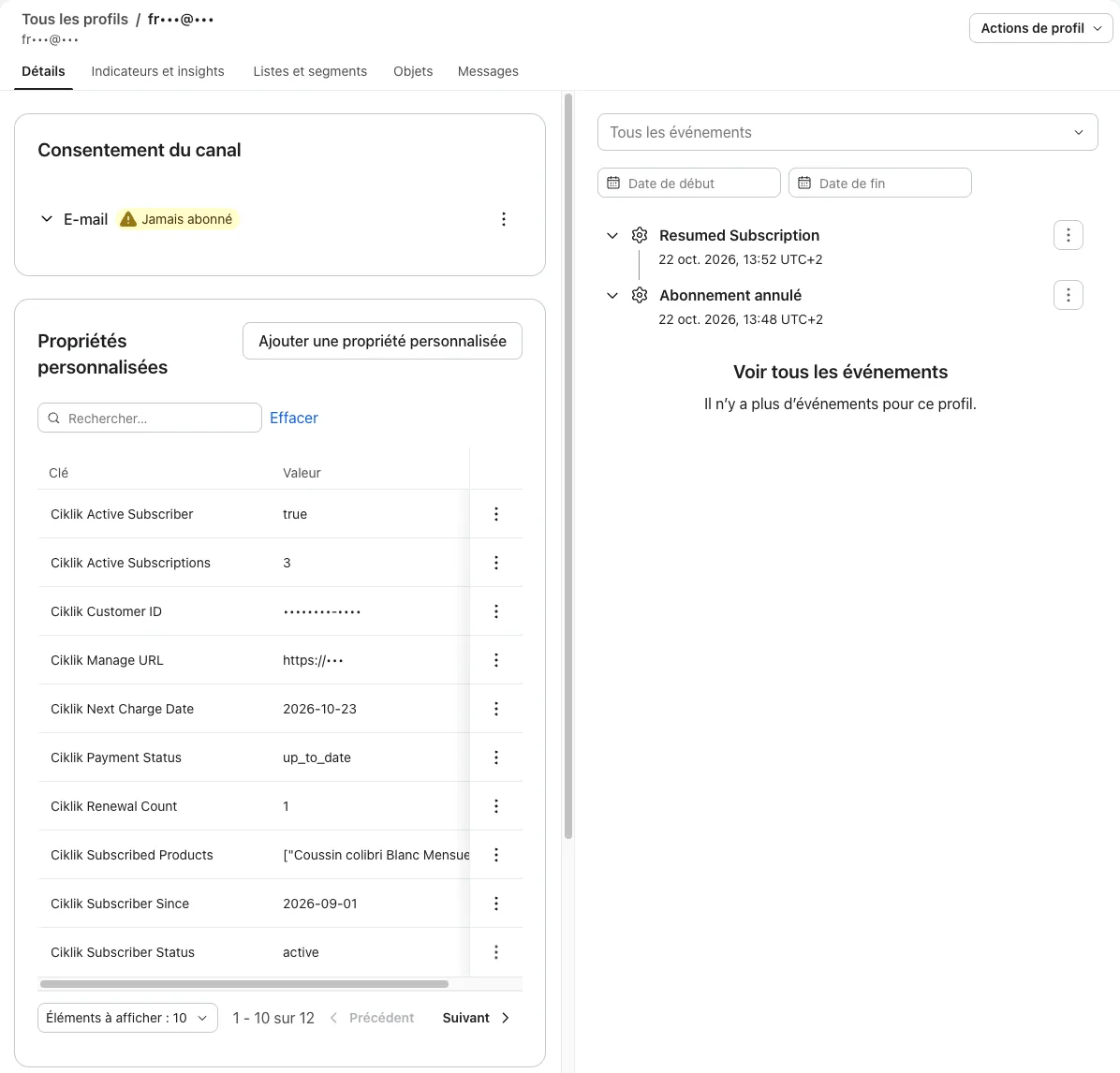
With each event, Ciklik updates on the customer’s profile properties computed over all their subscriptions on the site. They all start with “Ciklik” so they do not mix with yours or with those of the Klaviyo module for PrestaShop. For a PrestaShop store, only the profiles already created by the Klaviyo module for PrestaShop receive them: Ciklik creates no profile.
Property
Content
Ciklik Active Subscriber
true if the customer has at least one active subscription (paused included).
Ciklik Subscriber Status
active, paused (all their active subscriptions are paused) or cancelled.
Ciklik Active Subscriptions
The number of active subscriptions.
Ciklik Payment Status
unpaid if a renewal remains to be paid, otherwise up_to_date.
Ciklik Next Charge Date
The next charge, across all subscriptions (pauses excluded).
Ciklik Subscription Frequency
The frequency of each active subscription, for example 1 month.
Ciklik Plans
The plans of active subscriptions (box stores only).
Ciklik Subscribed Products
The products received: those of a product subscription, those chosen in a box.
Ciklik Subscriber Since
The date of the first subscription.
Ciklik Renewal Count
The number of paid renewals.
Ciklik Subscription Revenue
The total paid on their subscription orders.
Ciklik Commitment Ends On
The nearest end of commitment, if a commitment is running.
Ciklik Cancelled At
The date of the last cancellation, when no subscription is running any more.
Ciklik Last Cancellation Reason
The answer to the survey of the last cancellation.
Ciklik Manage URL
The link to the subscription area.
Ciklik Customer ID
The Ciklik ID of the customer.
Properties are sent with the profile at connection (see the sync), then updated with each event. In the French interface of Klaviyo, the Cancelled Subscription event can show as “Abonnement annulé”.
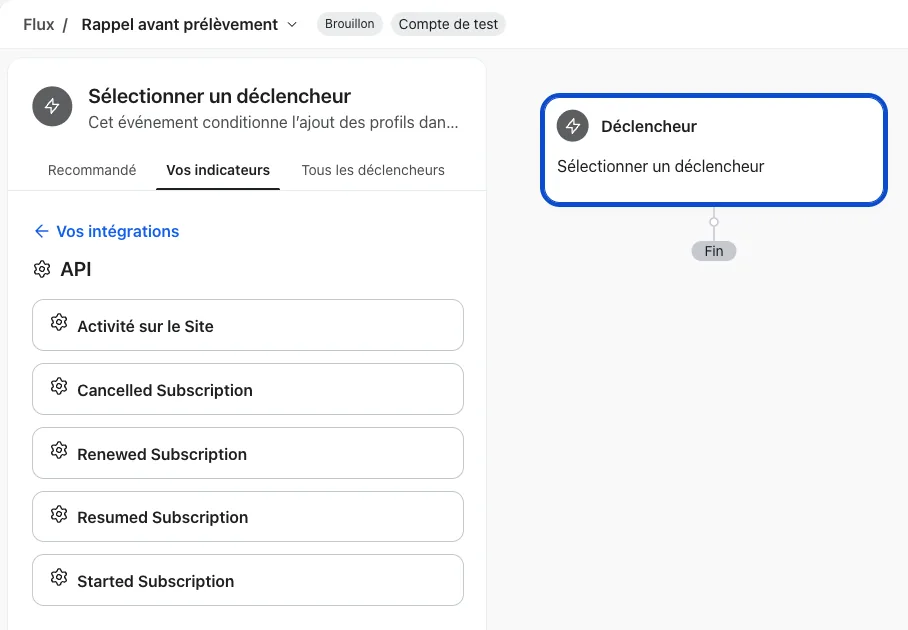
A flow starts from a trigger, waits, filters and sends. To create one: in Klaviyo, open Flows (Flux in the French interface) and create a flow from scratch. For the trigger, open the Your metrics tab (Vos indicateurs), then API, and choose the Ciklik event you want.
Thank the new subscriber and show them where to manage their subscription.
Subscriber welcome
TriggerStarted Subscription
EmailThank you, your subscription is set upSubscription content (Plan or Item Names), next charge date (Next Charge Date), button to Manage URL
Wait7 days
EmailMaking the most of your subscriptionTips, how to change the frequency, reschedule or pause
PrestaShop store. The Klaviyo module for PrestaShop also sends the order as “Placed Order”: see Avoiding a double send so that your post-purchase thank-you flow does not also write to a new subscriber.
The Klaviyo module for PrestaShop sends Placed Order for every order of your store, and each Ciklik renewal is one: a monthly subscriber therefore triggers a “Placed Order” every month, on top of Renewed Subscription sent by Ciklik. Your revenue in Klaviyo stays right (Ciklik sends no order), but your flows triggered by Placed Order also trigger at every renewal. Three ways to avoid it, to choose per flow:
Filter your post-purchase flows. For a thank you, a review request or product suggestions triggered by Placed Order, add a two-hour wait at the start, then a flow filter “has done Renewed Subscription zero times since starting this flow” (and, if you do not want to write to a new subscriber either, “has done Started Subscription zero times since starting this flow”). Ciklik sends these two events a few minutes after the order; the wait gives them time to arrive. A first-purchase flow filtered on “Placed Order zero times before” is not affected: a renewal is never a first purchase.
Use Renewed Subscription for your renewal messages. A renewal-specific message (thanks for your loyalty, content of the delivery) is triggered by Renewed Subscription rather than Placed Order: it goes out once per renewal, with the subscription content and Ciklik Renewal Count to adapt the tone.
Match both by the order number.Started Subscription and Renewed Subscription carry PrestaShop Order ID, the number of the order the module sends as Placed Order. It lets you match both events in your analyses or exports, and recognise a subscription order.
SplitIs Payment URL set?Yes: "Pay my order" button to Payment URL. No: button to Manage URL
EmailYour payment did not go throughReason adapted with Failure Reason (expired card, insufficient funds...), amount (Order Total)
Wait2 days
SplitIs Ciklik Payment Status still unpaid?No: the customer paid in the meantime, the flow stops
EmailReminder: your subscription is on hold
Each refused attempt sends a new event, with its number in Attempt. To avoid a follow-up at every attempt, limit in the trigger settings how often the same profile can enter the flow (for example once every 7 days). When retries are over, Exhausted Subscription Payment Retries can trigger a last message: the charge is lost, the subscription goes on.
Get the card updated before the next charge fails.
Expiring card
TriggerExpiring Payment CardOn the 25th, when the card expires before a charge in the coming month
FilterCiklik Active Subscriber is true
EmailYour card expires soonDate (Card Expires On), brand (Card Brand), button to Manage URL, where the customer manages their subscription and payment method
Reach out to the subscriber who left, with a message matching the reason they left. This is a commercial email: keep it to profiles subscribed to your marketing emails (consent filter).
Win-back after cancellation
TriggerCancelled Subscription
FilterProfile subscribed to your marketing emailsConsent given in your store
FilterCancellation Source is not scheduled_endLeaves out scheduled ends (commitment, gift card) if you want another message for them
Wait30 days
SplitIs Ciklik Active Subscriber still false?No: the customer subscribed again in the meantime, the flow stops
SplitDepending on Cancellation ReasonToo expensive: come-back offer. Too many products: slower frequency. Other: what is new
EmailWe miss youButton to Manage URL to reactivate
For a stronger offer, repeat with a 90-day wait. Resumed Subscription with Resumed From equal to cancellation lets you measure returns.
A segment is created in Klaviyo (Audience > Lists & segments > Create segment) from the “Ciklik” profile properties or from events.
Segment
Condition in Klaviyo
Active subscribers
Ciklik Subscriber Status equals active.
Paused
Ciklik Subscriber Status equals paused.
Unpaid
Ciklik Payment Status equals unpaid.
Cancelled in the last 90 days
Ciklik Cancelled At in the last 90 days.
Charge within 7 days
Ciklik Next Charge Date in the next 7 days.
Commitment ending within 30 days
Ciklik Commitment Ends On in the next 30 days.
Loyal
Ciklik Renewal Count at least 6.
Left because of the price
Ciklik Last Cancellation Reason contains the word from your survey, for example “price”.
Never subscribed customers (PrestaShop)
“Placed Order” at least once, and Ciklik Customer ID not set.
The “Ciklik” properties are sent with the profile at connection: a segment that uses them is right as soon as the sync is done. A segment that relies on an event, such as Placed Order, only fills in as orders arrive. The last segment is only reliable after a few months, once all your subscribers have an order.
Frequently asked questions
Which events does Ciklik send to Klaviyo?
Thirteen for a box store: Started Subscription, Upcoming Subscription Charge, Renewed Subscription, Rescheduled Subscription Charge, Failed Subscription Payment, Exhausted Subscription Payment Retries, Expiring Payment Card, Updated Subscription, Paused Subscription, Resumed Subscription, Cancelled Subscription, Started Gift Subscription and Converted Gift Subscription. A PrestaShop store gets eleven, without the two gift events.
Does Ciklik send orders to Klaviyo?
No. For a PrestaShop store, orders come from the Klaviyo module for PrestaShop, renewal orders included. Ciklik only adds the PrestaShop order number to Started and Renewed Subscription, to tell a renewal from a first purchase.
How many days before the charge is the reminder sent?
3 days by default. You set it from 1 to 14 days with the Manage the Klaviyo connection action, Edit settings, on the site record. It is sent around 8:30 a.m., Paris time, and never for a paused subscription.
Why can't I find a Ciklik event as a flow trigger?
Klaviyo only offers a metric once it has received a first one. As long as no card has expired, for example, Expiring Payment Card does not appear in the list.
Is the payment link safe?
It logs the customer in on the payment page of their refused order without a password, as long as that order remains to be paid, then stops working. Only place it in an email sent to that customer and keep access to your Klaviyo to trusted people.
Why do my Placed Order flows trigger at every renewal?
For a PrestaShop store, each Ciklik renewal creates a real order that the Klaviyo module for PrestaShop sends as Placed Order. Filter your post-purchase flows (a wait, then "Renewed Subscription zero times since starting this flow"), or trigger your renewal messages on Renewed Subscription.
Does Ciklik give consent for my commercial emails in Klaviyo?
Never for a PrestaShop store: consent stays with the Klaviyo module for PrestaShop. For a box store, only if you have chosen a subscription list: your customers are then subscribed to it as with Mailchimp, except those who unsubscribed. Without a list, Ciklik gives no consent. In every case, for a commercial email, such as a win-back or an offer, add a filter to your flow that keeps only profiles subscribed to your marketing emails. A service message can be marked transactional under Klaviyo's rules.